阿里云 · DBS

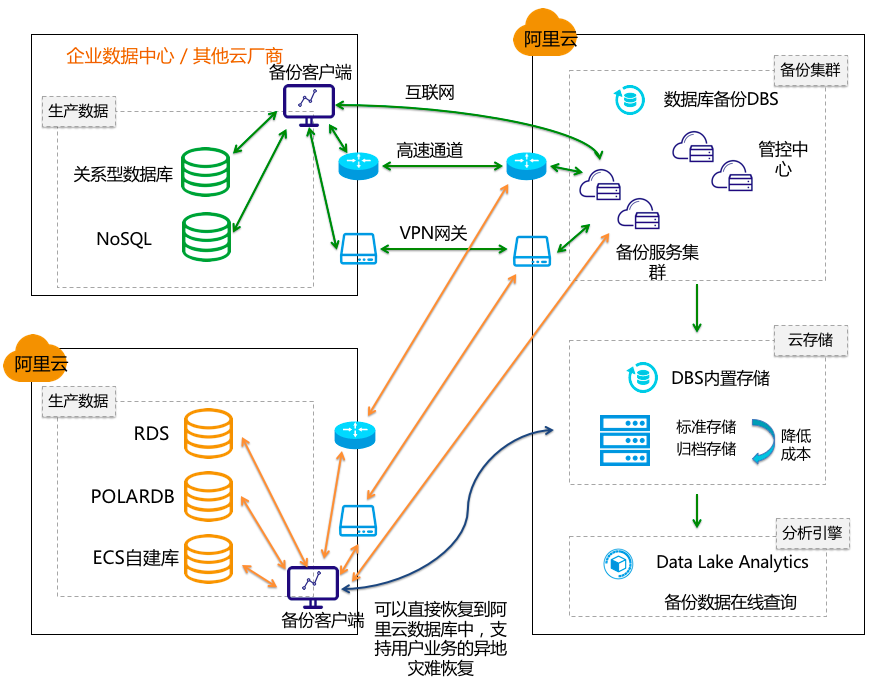
DBS 简介

安装备份网关

1
2
3
4
5
6
7
8
9
10
11
12
13
14
15
16
17
18
# 检查java环境
java -version

# 安装网关
cd /opt
wget -O aliyunDBSAgentInstaller.jar https://aliyun-dbs-cn-qingdao.oss-cn-qingdao.aliyuncs.com/installer/0.0.83/aliyunDBSAgentInstaller-0.0.83.jar && sudo java -Dregion=cn-qingdao -jar aliyunDBSAgentInstaller.jar

# 创建备份账号
GRANT all privileges on *.* to 'backup'@'%' identified by 'Backup@123!';

# 设置超时参数
set global wait_timeout=28800;
set global interactive_timeout=28800;

# 修改jvm内存
/usr/local/aliyun/dbs_agent/bin/aliyun-dbs-agent.sh
JVM_FLAGS="-Xmx2048m -XX:+HeapDumpOnOutOfMemoryError "
./aliyun-dbs-agent.sh restart
1
2
sudo: java: command not found
yum install -y java

备份过程中遇到的问题

逻辑备份

  • 报错信息
1
2
异常信息: -1
java.lang.IllegalStateException: The RecordSplit 5 must be in FAILED or SUCCESS
  • 原因分析:数据库表损坏
1
java.sql.SQLException: Table 'base_scan_record_t' is marked as crashed and should be repaired
  • 解决办法:检查并修复表
1
2
3
4
5
6
7
8
mysql> check table base_scan_record_t;
+----------------------------------+-------+----------+----------+
| Table | Op | Msg_type | Msg_text |
+----------------------------------+-------+----------+----------+
| cosmo_im_1008.base_scan_record_t | check | status | OK |
+----------------------------------+-------+----------+----------+

repair table base_scan_record_t

物理备份

  • 报错信息
1
2
异常信息: 999999
DBS-999999, message :Unable to find 'completed OK!' at the end of the file: /usr/local/aliyun/dbs_agent/dbbackup/2020-08-06/1ib0xmr67jbl0_dbbackup.log, msg: 200807 02:51:07 [04] ...done Error: failed to execute query SET SESSION lock_wait_timeout=31536000: MySQL server has gone away .
  • 原因分析:怀疑是 MySQL 连接超时导致的,MySQL 连接超时是由两个参数控制的interactive_timeoutwait_timeout,它的意思是某个 MySQL 长连接很久没有新的请求发起,达到了 server 端的 timeout,被 server 强行关闭。此后再通过这个 connection 发起查询的时候,就会报错 server has gone away。
1
2
3
4
5
6
7
8
9
10
11
12
13
14
15
16
17
MySQL [(none)]> show variables like '%timeout%';
+-----------------------------+----------+
| Variable_name | Value |
+-----------------------------+----------+
| connect_timeout | 10 |
| delayed_insert_timeout | 300 |
| innodb_flush_log_at_timeout | 1 |
| innodb_lock_wait_timeout | 50 |
| innodb_rollback_on_timeout | OFF |
| interactive_timeout | 300 |
| lock_wait_timeout | 31536000 |
| net_read_timeout | 30 |
| net_write_timeout | 60 |
| rpl_stop_slave_timeout | 31536000 |
| slave_net_timeout | 3600 |
| wait_timeout | 300 |
+-----------------------------+----------+
  • 解决办法:将 interactive_timeoutwait_timeout 都调成默认值 28800

  • 异常报错:

1
999999: DBS-999999, message :Upload files to oss: urumz5gygew1/full/vbt0gyzeqh4k failed, msg: Java heap space.
  • 解决办法:
1
2
/usr/local/aliyun/dbs_agent/bin
./aliyun-dbs-agent.sh stop/start
  • 增量日志备份:
1
2
提醒:999999
DBS-999999, message :Upload files to oss: t4ygmdbe494h/continuous/1jetth0q6x1kp/3.trn.inc failed, msg: Could not read desire data len, dataLength: 6750208.
  • 安装备份网关失败:
1
2
3
4
2020-08-26 15:28:15 ERROR Ping:19 - hostname dbs.cn-hangzhou.aliyuncs.com telnet error: dbs.cn-hangzhou.aliyuncs.com
2020-08-26 15:28:15 ERROR Ping:19 - hostname dbs-inner.cn-qingdao.aliyuncs.com telnet error: dbs-inner.cn-qingdao.aliyuncs.com
2020-08-26 15:28:15 ERROR POPTransporter:187 - add endpoint to default profile failed
com.aliyuncs.exceptions.ClientException: Network is down?
1
2
3
4
5
[root@cosmoim-d-cqbl logs]# cat /etc/resolv.conf
nameserver 10.138.92.77
nameserver 10.138.92.76
nameserver 192.168.100.1
nameserver 192.168.100.2
1
2
yum provides '*/applydeltarpm'  
yum install deltarpm -y
1
2
3
4
5
6
7
8
9
10
11
12
13
14
yum provides '*/applydeltarpm'  
yum install deltarpm -y

yum clean all
rm -rf /var/cache/yum/*
yum clean metadata

yum clean
yum clean all
yum clean all
yum makecache
yum install -y java
yum install java-1.8.0-openjdk -y
yum install java-1.8.0-openjdk-devel -y

异常报错:

错误码为 InvalidTimeStamp.Expired,错误信息为 Specified time stamp or date value is expired.

解决方法:

将本地环境(即调用SDK的应用程序所在的机器)的时钟调整准确即可

1
2
3
4
5
6
7
8
9
10
11
12
13
14
15
16
17
18
[root@localhost ~]# timedatectl 
Local time: 本地时间,与系统设置的时区有关系,北京时间简写CST
Universal time: 协调世界时,简写为UTC
RTC time: 硬件时间,默认显示时间是UTC时间
Time zone: 当前时区
NTP enabled: 是否设置NTP服务开机启动
NTP synchronized: NTP服务是否已经同步时间
RTC in local TZ: 硬件时间是否是本地时区
DST active: 夏令时是否可用 n/a(Not applicable,不可用)

# 修改时区
[root@localhost ~]# timedatectl set-timezone Asia/Shanghai

# 禁用NTP
[root@localhost ~]# timedatectl set-ntp false   

# 修改本地时间
[root@localhost ~]# timedatectl set-time "2022-10-10 11:11:11"
1
2
3
4
5
6
7
8
9
10
11
12
# UTC 时间
整个地球分为二十四时区,每个时区都有自己的本地时间。在国际无线电通信场合,为了统一起见,使用一个统一的时间,称为通用协调时(UTC, Universal Time Coordinated)。

# GMT 时间
格林威治标准时间 (Greenwich Mean Time)指位于英国伦敦郊区的皇家格林尼治天文台的标准时间,因为本初子午线被定义在通过那里的经线。(UTC与GMT时间基本相同,本文中不做区分)

# CST 时间
中国标准时间 (China Standard Time)
GMT + 8 = UTC + 8 = CST

# DST 时间
夏令时(Daylight Saving Time) 指在夏天太阳升起的比较早时,将时钟拨快一小时,以提早日光的使用。(中国不使用)